How to stop IPL, enter CLI, boot ifs-emergency.ifs and restore ifs.root-stage2
- Connect TTL adapter to UART of RCC
- Run any terminal program from the table below and connect. On the keyboard, press and hold the key combination, power the unit via quadlock and quickly press Enter.
| Program | Key Combination | |
|---|---|---|
| Putty | CTRL+ BREAK | 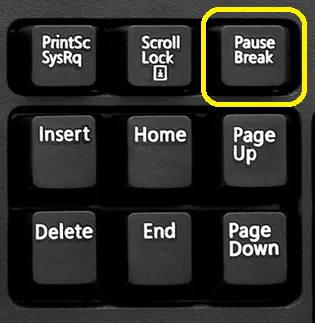 |
| MobaXterm | CTRL+ BREAK | |
| TeraTerm | ALT + B |
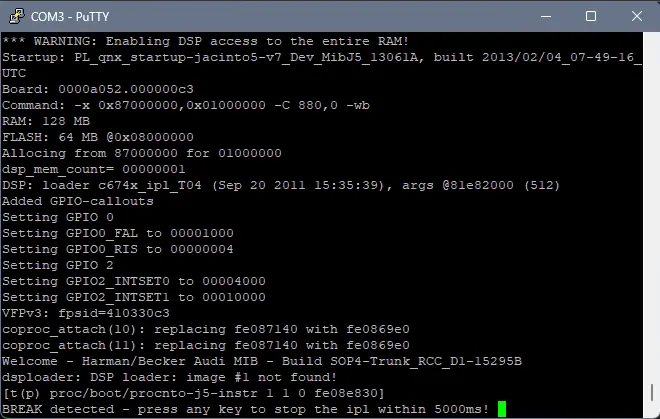
- On some firmwares, first you need to power on the unit and only then quickly press and hold the Ctrl+Pause key combination for about 1 second until you see the "BREAK detected" line:
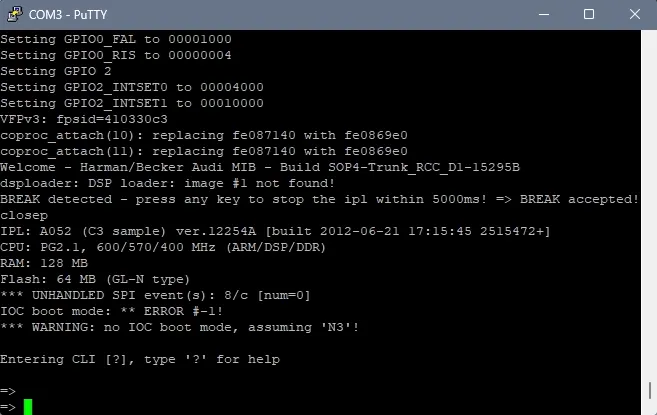
- Press any key and you should see a confirmation: "BREAK accepted!" and CLI (command line interface) prompt:
- To boot ifs-emergency.ifs enter:
boot -t emerg
- Login to ksh shell with root and password
-
IMORTANT! Before you continue, make sure you are in the 2nd boot of Emergency IFS and DevelperMode is enabled or MIBEmergency is slayed
-
After you logged in, check if RCC filesystem is mounted
stfu ; ls /dev/fs*if not, then mount it with following command:
/usr/bin/stop_efs_driver.sh && /sbin/devf-generic -s0x08000000,64M,,,128k,2,1 -r -D -P 1 -
Make sure the m.i.b. SD is inserted into SD1 slot. You can flash RCC stage2 like this (just replace the address to match your stage2 file in m.i.b. patches folder):
slay -9 MIBEmergency ; /net/mmx/fs/sda0/apps/sbin/flashunlock/net/mmx/fs/sda0/apps/sbin/flashit -v -d -x -a 0x00ba0000 -f /net/mmx/fs/sda0/patches/7807-ifs-root-stage2-0x00ba0000-EC5CCC00_FEC_CP.ifs &
- When the flashing finished, just reboot and enjoy.
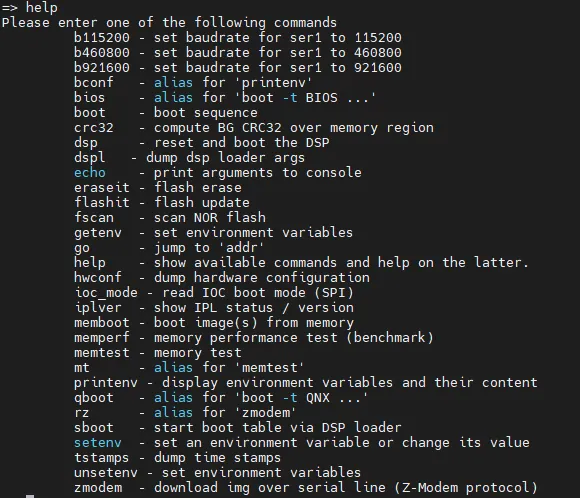
CLI command list reference
Community content mirrored from mibwiki.one. Always make a backup before flashing or coding a unit.