02xx to 04xx firmware update
Needed
- Quality SD card,
4GBor more (how to check SD card), 04xxtarget firmware,- patch for
SWDL, - Custom
metainfo2.txt, - VCP/VCDS/OBDeleven/CarScanner to enable developer mode.
Recommended
- Highest currently supported firmware installed (if not in the unit yet). Check it here.
- Confirmation that touch screen is 100% working. It will be required to press
Xin the corner of the display when the installation is complete.
Prepare SD card
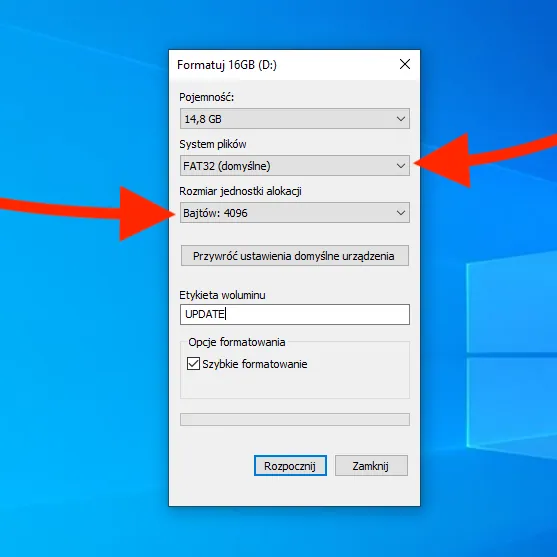
Format an SD card with FAT32 file system.
Make sure to set the Allocation unit size to the smallest option available (example 4096B).
Update to highest supported firmware
https://youtu.be/6FlHM9VZl%5Fs
Enable developer mode
Developer mode access is required to perform 02xx to 04xx firmware update.
Check out 5F - Enabling Developer Mode and Hidden Menu for more information about enabling developer mode in MIB units with OBDeleven, VCDS, VCP, CarScanner.
Patch SWDL
SWDL app (tsd.mibstd2.system.swdownload) needs to be patched in order to accept custom metainfo2.txt file. Check out SWDL Patch - install unsupported firmware for information about different methods of patching SWDL app in Technisat units.
Set default system skin
Prepare 04xx firmware custom metainfo2.txt
-
Press
MENUbutton for 3 seconds to engine hidden service menu. -
Go to
Software update/versions > Versions, select your current firmware version, go toCPUand and check CPU ID.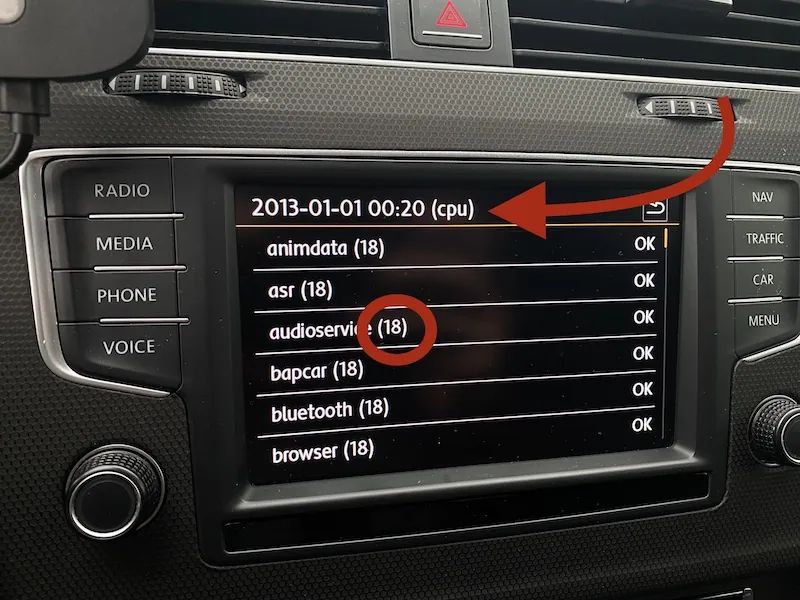
-
Go to https://github.com/lprot/MIB-Tools and download the repository. It includes a script will prepare
metainfo2.txtfile for your unit by changing value inRequiredVersionOfDMand linking CPU ID from 04xx version to the one in your unit. -
Place
metainfo_link_generator.pyfile inside the 04xx firmware directory and run it. Provide CPU ID from your unit when asked.
Install 04xx firmware
- Turn on the unit.
- Remove SD cards, Insert SD card with prepared firmware in SD1 port.
- Press and hold
MENUbutton for 10 seconds to enterTestmodemenu - Go to
SWDL > Software Download Manual Downloadand enable it. - Select
Start Download. - Press
Select allfirst, but don't start the update just yet. - Go to
cpu`` > emergencyand disableApplication. - Go to
main > emergencyand disableApplication.
- Press
Start, cross fingers, and wait. Unit will reboot 2 or 3 times.
Updating emergency apps
- Patch current SWDL app (
tsd.mibstd2.system.swdownload) the same way you did it with the old one. - Press and hold
MENUbutton for 3 seconds. - Go to
Software update/versions>Update, selectSD1source. - Confirm that SWDL wants to update two emergency applications.
- Start the update.
Patching
If unit was previously patched for SWaP, CP, CID, the 04xx update will overwrite it. Your new system is stock and you need to patch it again. You can upload patches manually, with SD card, or by MIB STD2 Toolbox.
TechniSat SWaP Patch with Toolbox
TechniSat CID Patch with Toolbox
Parametrization
Coding review
Newer firmware might not support older cars. Check variant coding and adjust if required.
More information here: 5F - Vehicle Variants.
Check skin coding to make sure your unit is not set to non-existing skin setting.
B201A fault
Check how to clear the B201A fault over here: 5F - Fix B201A fault code
HOW DO Technisat_FW-Train_from_2_to_4
What's new?
- Support for facelift glass displays with
APPbuttons, - GEM version
4.11with touch screen navigation support, - Support for VC/AID (Virtual Cockpit / Active Info Display),
- Support for new USB HUB,
- Updated graphics with facelift car models (CAR, AUDIO, CLIMATE menus),
- New skin layouts (grid) and new system-wide color theme,
- Refreshed VW startup animations and new trim options (
beatsaudio,FAMILY,Elegance), - Skin and startup animation for MAN vehicles,
- 6 presets in
Radiosection if 8-inch display skin selected, - 6 favourite contact in
Phonesection if 8-inch display skin selected, - Media covers higher resolution support (needs to be confirmed),
- CAR menu selection is remembered after switching ignition off,
- Oil temperature gauge (SportHMI and Offroad) without red zone and rescaled for 100°C in middle position,
- Start/Stop option to disable system status popups,
- Air Condition option in main menu,
- VW Media Control option in menu,
- Configuration Wizard in Settings,
- Traffic menu with map preview,
- WLAN media source option,
- 4 clock faces selection in standby,
- Sound type displayed on the OSD when adjusting volume level,
- Updated SFX when touching the screen,
- FEC/SWaP hidden menu available without active developer mode,
- Testmode menue available from hidden menu (3 seconds press instead of 10 seconds press),
- FEC/SWaP code
00070400for in-car communication is supported, - Testmode menue touch screen diagnostics no longer works,
- Left and right speaker channels are inverted (here's how to fix this by repining QuadLock),
- New adaptation channels (
Key_code_monitoring,Vehicle function list BAP 2nd generation, expansion,Deactivation/activation of the pop-up for active tracking services,nhtsa_properties), - New
cpumodules (fpkimagetransfer,i2cbridge,nuanceres.arw_EU).
Community content mirrored from mibwiki.one. Always make a backup before flashing or coding a unit.