5F - Rear View Camera (RVC-HIGH) installation
Parts
Part numbers are hard to keep track of with VAG continuously superseding/changing part numbers. In general you need to look for a camera that fits the handle or with correct size swinging emblem or with mounting support (Seat Leon and Ibiza).
For Leon and Ibiza the bumper needs to be cut, see template
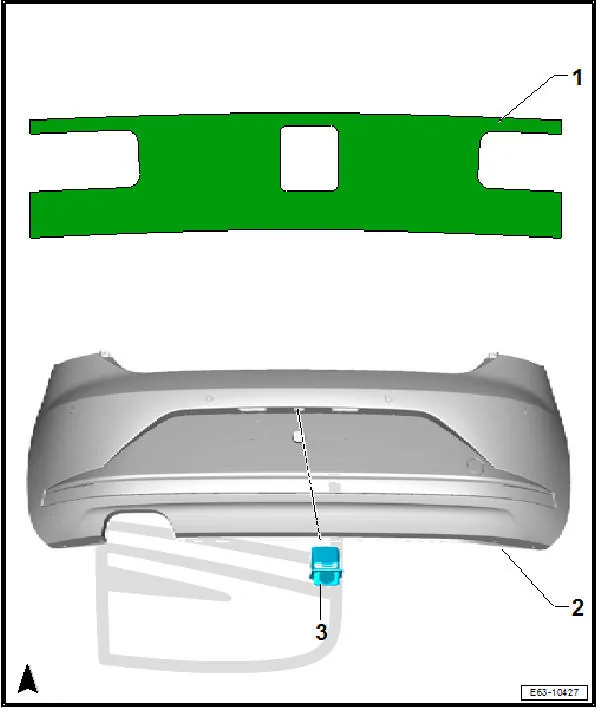 more info: https://www.seatia.com/secon-917.html
Camera
-
VW Golf MK7 hatchback:
5G0-827-469-H;5G0-827-469-P;5G0-827-469-R;5G0-827-469-T,5G0-827-469-AF -
VW Golf MK7 estate/variant:
5G9-827-469-G;5G9-827-469-H;5G9-827-469-Q;5G9-827-469-S;5G9-827-469-AA,5G9-827-469-AG,5G9-827-469-AJ. -
VW Golf sportvan:
510-827-469-E,510-827-469-G,3G0-827-469-BL,3G0-827-469-CA,3G0-827-469-CJ,3G0-827-469-FL,3G0-827-469-FS. -
VW Passat B8 estate/variant and Arteon coupé with back glass high polished logo:
3G0-827-469-E,3G0-827-469-H,3G0-827-469-E,3G0-827-469-L,3G0-827-469-AA,3G0-827-469-AQ,3G0-827-469-BB,3G0-827-469-BJ,3G0-827-469-BL,3G0-827-469-BS,3G0-827-469-CA,3G0-827-469-CG,3G0-827-469-CJ,3G0-827-469-FL,3G0-827-469-FL,3G0-827-469-FS,3G0-827-469-GC,3G0-827-469-HN. -
VW Passat B8 estate/variant and Arteon coupé with black/bright chrome logo (new logo from 2020):
3G0-827-469-EK,3G0-827-469-ER,3G0-827-469-FE,3G0-827-469-HE. -
VW Passat B8 sedan and Arteon sportback with back high glass polished logo:
3G0-827-469-F,3G0-827-469-CD,3G0-827-469-FM,3G0-827-469-FT,3G0-827-469-HK. -
VW Passat B8 sedan and Arteon sportback with black/bright chrome logo (new 2020 VW logo):
3G0-827-469-EG,3G0-827-469-EN,3G0-827-469-FL,3G0-827-469-FH,3G0-827-469-HB.
Wiring kit
AliExpress: http://ali4cars.com/s/?p=vw-mqb-rvc-high-wiring
Coding
Add new module to gateway installation list
19→ adaptation →Installation list→specified installations - Camera System Rear View→coded
Enable RVC-HIGH in MIB module
5F→ Long Coding → Byte:19→ Bit:4→disable5F→ adaptation →Car Function List BAP Gen2→VPS_0x0B→activated5F→ adaptation →Car Function List BAP Gen2→VPS_0x0B_msg_bus→Comfort data bus
Enable camera support in parktronic module
10→ Long Coding → Byte:02→ Bit:4→enable10→ Long Coding → Byte:02→ Bit:5→disable
Enable camera BAP communication
6C→ Long Coding → Byte:10→ Bit6BAP for display data
Code vehicle and region
6C→ Long Coding → Byte:00→ vehicle brand6C→ Long Coding → Byte:01→ vehicle class and generation6C→ Long Coding → Byte:02→ vehicle body type6C→ Long Coding → Byte:03→ region
Code vehicle optional equipment
6C→ Long Coding → Byte:04→ Bit0Trailer Control Unit (J345) installed6C→ Long Coding → Byte:04→ Bit1Optical Parking Sensors (OPS) installed6C→ Long Coding → Byte:04→ Bit2ParkSteer Assist (PLA) installed6C→ Long Coding → Byte:04→ Bit5DSG/Automatic Transmission installed6C→ Long Coding → Byte:04→ Bit6Swinging Logo installed6C→ Long Coding → Byte:04→ Bit7Electric Parking Brake (EPB) installed6C→ Long Coding → Byte:10→ Bit2Trailer Towing Assistant (TTA/ARA) Mechanical installed6C→ Long Coding → Byte:10→ Bit3Trailer Towing Assistant (TTA/ARA) Optical installed6C→ Long Coding → Byte:10→ Bit4Tow Bar (AHK) installed6C→ Long Coding → Byte:10→ Bit5Rollback recognition
Enable all 4 view modes in camera module
6C→ Long Coding → Byte:07→ Bit:0→enable(standard 90° view)6C→ Long Coding → Byte:07→ Bit:1→enable(parallel parking assist view)6C→ Long Coding → Byte:07→ Bit:2→enable(trailer towing view)6C→ Long Coding → Byte:07→ Bit:4→enable(fish-eye/cross-traffic view)
Other coding options
-
6C→ Long Coding → Byte:04→ Bit:3-4Steering variant -
6C→ Long Coding → Byte:05→ Bit:0Camera input: Rear -
6C→ Long Coding → Byte:05→ Bit:1Camera input: Left -
6C→ Long Coding → Byte:05→ Bit:2Camera input: Right -
6C→ Long Coding → Byte:05→ Bit:3Camera input: Front -
6C→ Long Coding → Byte:05→ Bit:4Camera input: Interior -
6C→ Long Coding → Byte:05→ Bit:5Camera input: Trailer -
6C→ Long Coding → Byte:06→ Bit:0Warning message via FSG -
6C→ Long Coding → Byte:06→ Bit:1Resolution of warning message in QVGA (instead of VGA) -
6C→ Long Coding → Byte:06→ Bit:5Deactivation of rear driving direction display -
6C→ Long Coding → Byte:09→ Bit:53D Presentation -
6C→ Long Coding → Byte:??→ Bit:?Cleaning option -
6C→ Long Coding → Byte:??→ Bit:?Flicker frequency -
6C→ Long Coding → Byte:??→ Bit:?Warning message method
Additional light when using camera
6C→ Long Coding → Byte:08→ Bit:2→enable(manoeuvre light)09→ Security Access → Code:3134709→ Adaptation →Aussenlicht_uebergreifend - Umfeldleuchte als Manoevrierleuchte→enable
Hide parking sensor image overlay by default
5F→ Long Coding → Byte:16→ Bit:7→enable(hide sensors overlay by default)
Sample coding
- 2015 VW Golf MK7, Variant, Europe, RVC-High:
01 73 02 01 E2 00 20 17 00 00 40 - 2018 Audi Q7 4M, Europe, RVC-High:
02 37 06 01 12 00 20 01 40 00 40 - 2017 Audi A4 B9, Area View:
02 94 01 01 BA 0F E3 00 08 71 40 04 - 2016 VW Passat B8, Sedan, Europe, Area View:
01 84 01 01 E7 0F 20 00 00 20 40 14 - 2016 Audi A7, Europe:
02 75 03 01 02 01 00 03 00
Parameterization
==pending…==
-
Camera control unit module is
5QO-980-556B or 5Q0-980-568-B,… -
Area view control unit is 5Q0-907-556_
-
There are datasets available on MIB Vault for these cameras are other models
-
If mounting a brand new camera without dataset (virgin unit) it will give 3 errors (
B2013,B2010,U1013). Long coding will be00 00 00 00 00 00 00(all zeros), and it will reject coding attempts. To see if wiring is proper it will be present as6Camong modules. For vehicles with swinging logo it can also perform output tests: it pops out when triggered, but without dataset it won't show the video feed. -
Once a dataset has been loaded a full long coding will be needed to activate the camera. Use coding from same model or from module whose dataset you loaded.
e.g. for Golf with OE 5Q0980568 camera
01 73 00 01 E6 00 23 1F 00 00 40and then adjust it for options present on the car.
5Q0980556B Dataset collection + coding example.zip 4485780
==In the archive there's a wide variety of datasets and some example codings for most MQB cars==
Basic settings
==pending…==
- Best performed with ODIS-S using guided functions, needs calibration board
VAS 6350. Look into car workshop manual for the distance from the rear axle, typically it's 1.5M-2M. ODIS-S might provide suggestions during the guided function. - Without calibration the rear camera will work normally but an error (
B2010- No basic settings) will be present and the video feed might be slanted.
Vehicle pin-out
- MIB → Quadlock → connector B (blue) → pin
6→ video signal - MIB → Quadlock → connector B (blue) → pin
12→ shield - MIB → Quadlock → connector D (grey) → pin
6→ CAN-BUS high - MIB → Quadlock → connector D (grey) → pin
12→ CAN-BUS low - Cabin fusebox → fuse
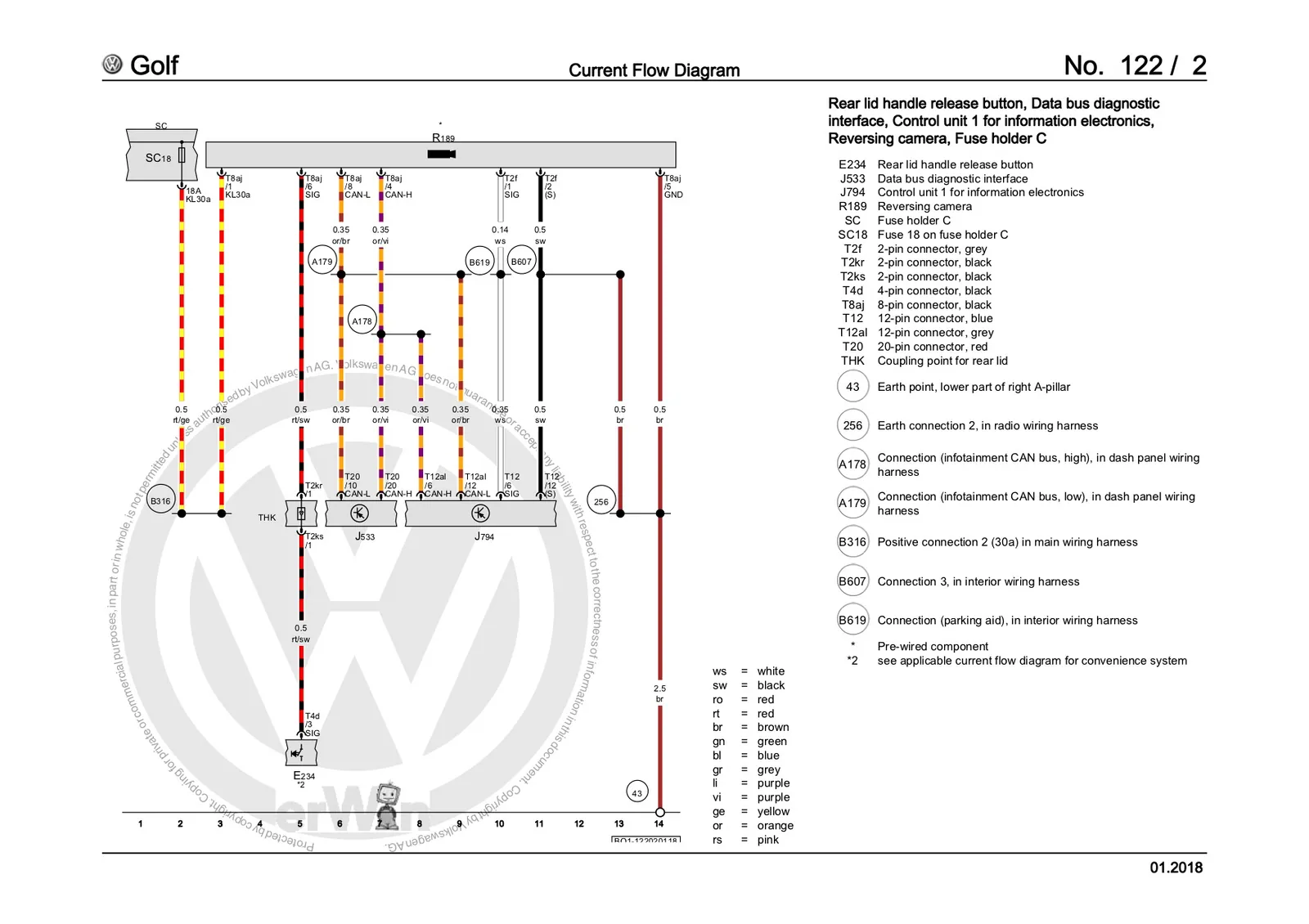
18→ term. 30 power to camera and mechanism (7.5Amp fuse) - Cars with swinging emblem need to add two wires to the lid handle release connector (E234): power from Sc18 on pin4, opening signal from camera control unit to pin3 (pin on camera control unit depends on the control unit, look R189 in the specific car diagram)
VW Golf MK7 5G - Current Flow Diagram - high RVC.jpg 299530
Video tutorials (VW Golf MK7 specific)
Part 1 - test of used camera with messy wiring
Part 2 - wiring with AliExpress kit
Part 3 - coding and adaptation
Part 4 - basic settings and calibration
==pending…==
Community content mirrored from mibwiki.one. Always make a backup before flashing or coding a unit.